Free live webinarNext date: coming soon
AI was supposed to reduce your workload. Why has it become another job?
One live session: how to give AI one job it can finish, check its work, and measure whether it saves you time.
Free. Signing up subscribes you to my Substack newsletter, and the invite comes by email once the date is set.
At the end, I'll share an optional paid pilot for people who want help applying this.
Sound familiar?
- I've spent more time setting up AI than doing the work.
- There are too many AI options, and nobody tells me which one fits.
- Every morning I feel further behind.
- Every tool looks useful in the trial. None of them proves it.
- Whatever I build breaks quietly, and I'm the one who fixes it.
- I explain my business again in every new chat.
What I'll walk you through
Four parts, one session
Why AI turned into another job
Where the extra work comes from: a new tool every week, the same context typed into every chat, and setups nobody keeps up.
Hire one system, not ten tools
One setup you understand, one place where you talk to it, and the AI plan you already pay for.
Give it one job it can finish
One priority, the materials it needs, one AI-assisted step, one usable output, and one check before anything goes out.
Run its performance review
Minutes per run before, minus minutes per run after, with your review and fixes counted.
“If it adds work, it's fired.”
Then I'll walk through the 30-day pilot: who it's for, and who should skip it.
What one job looks like
One job, start to finish
You ask in a chat thread and attach what it needs. The agent drafts from your notes and tells you what to check.
You read it and reply. In this example, nothing goes out until you've checked it.
Illustration: in a chat thread, you ask the agent to draft the follow-up from today's call and attach call-notes.txt. The agent drafts it and lists what to check: names, next steps, dates. You reply: Approved. The agent says the final copy is ready to paste and nothing was sent.
Is this for you?
This is for business owners and operators who already use AI and want it to do real work. If you're brand new to AI, my free YouTube videos are a better place to start.
It's for you if
- You already pay for ChatGPT, Claude or a similar tool, and you use it for work
- You run or operate a business and have one task you'd like off your plate
- You'd rather have one setup you understand than another tool to keep up with
- You're ready to try it on real work, not just watch
Skip it if
- You're completely new to AI
- You want to test every new tool that comes out
- You need a large custom integration for a big company
- You're after a hands-off fix that takes none of your time
Who's hosting
Hi, I'm Daniel
I run DOO MADE, where I set up AI systems for small businesses, and I make YouTube videos about AI tools and running AI on your own machine.
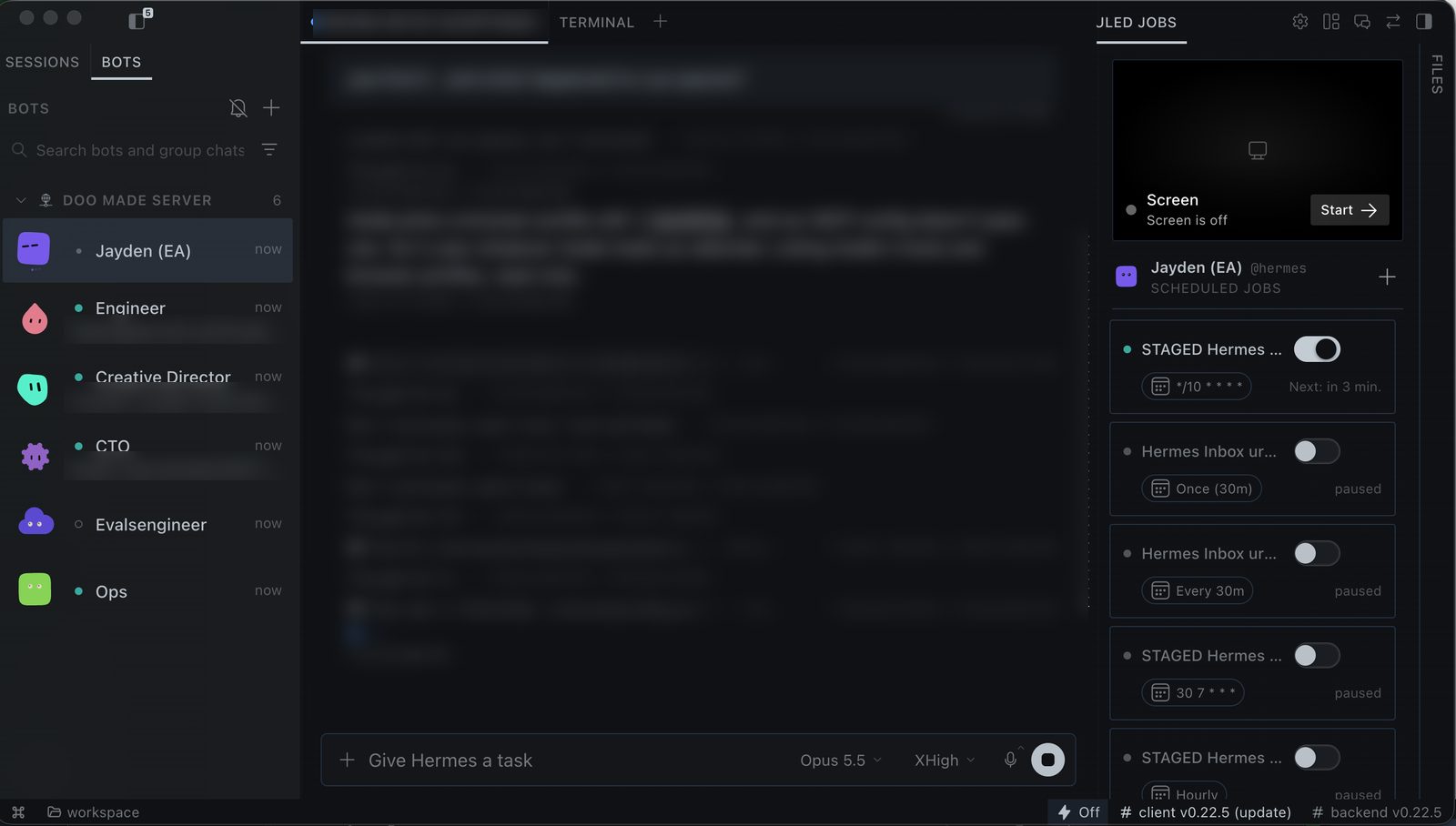
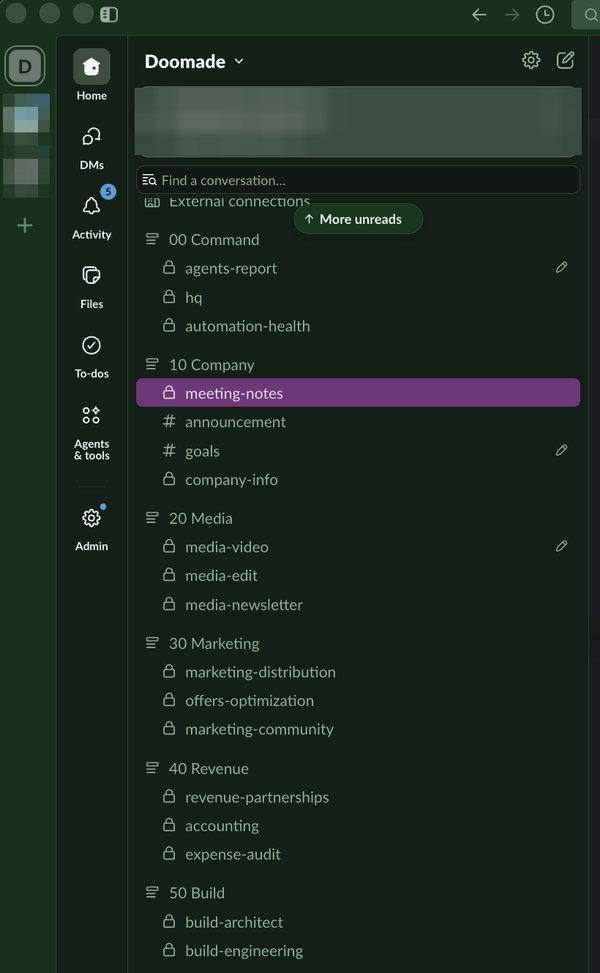
I run my own company on the setup I'll show you: a team of AI agents in Slack, each with its own job, and I check what they make before it goes out.
- YouTube subscribers
- 38.2K
- video views
- 2M+
- videos
- 576
My YouTube channel, as of Nov 8, 2026.
What happens live
My setup, working
I'll show my own setup doing real work, live.
Your task, checked
Bring one task you'd like off your plate. With your permission, I'll check a few of them against the one-job rule.
Your questions
Ask anything about making AI useful in your business, and I'll answer live.
The optional pilot
At the end, I'll share a paid 30-day pilot for people who want help applying this. You can leave before that part.
Questions
When is it?
The date isn't set yet. Sign up, and the invite comes to your inbox as soon as it is.
Is this a sales pitch?
Most of the session is teaching and live checks. At the end, I'll share an optional paid pilot for people who want help applying this, and you can leave before that part.
Is this just ChatGPT with a custom prompt?
No. ChatGPT or Claude is the model, the AI brain. What I show is the system around it: its instructions, its tools and the workflow, so it does one job the way you set it up.
Do I need to be technical?
No. I explain each part in plain words, and you can ask questions live.
Do I need a powerful computer or local AI?
Not for the webinar. To run the setup yourself, you need a computer that can stay on. Local AI is optional.
I already pay for ChatGPT or Claude. Is this another subscription?
The webinar is free. The setup runs on the AI plan you already have, and the setup tools are free by default.
How long is it, and is there a replay?
The length and the replay details come with the invite.
What does the pilot cost?
I'll go through the details, including the price, at the end of the session.
Next date: coming soon
Sign up once, and the invite comes by email when the date is set.
Free. At the end of the session, I'll share an optional paid pilot.